My Terminal-First AI Workflow
May 3, 2026 · 6 min read
Most AI coding tools want you inside their app. A dedicated GUI, a custom editor, a new thing to learn. I went the other direction — I built my workflow on top of the terminal tools I already use.
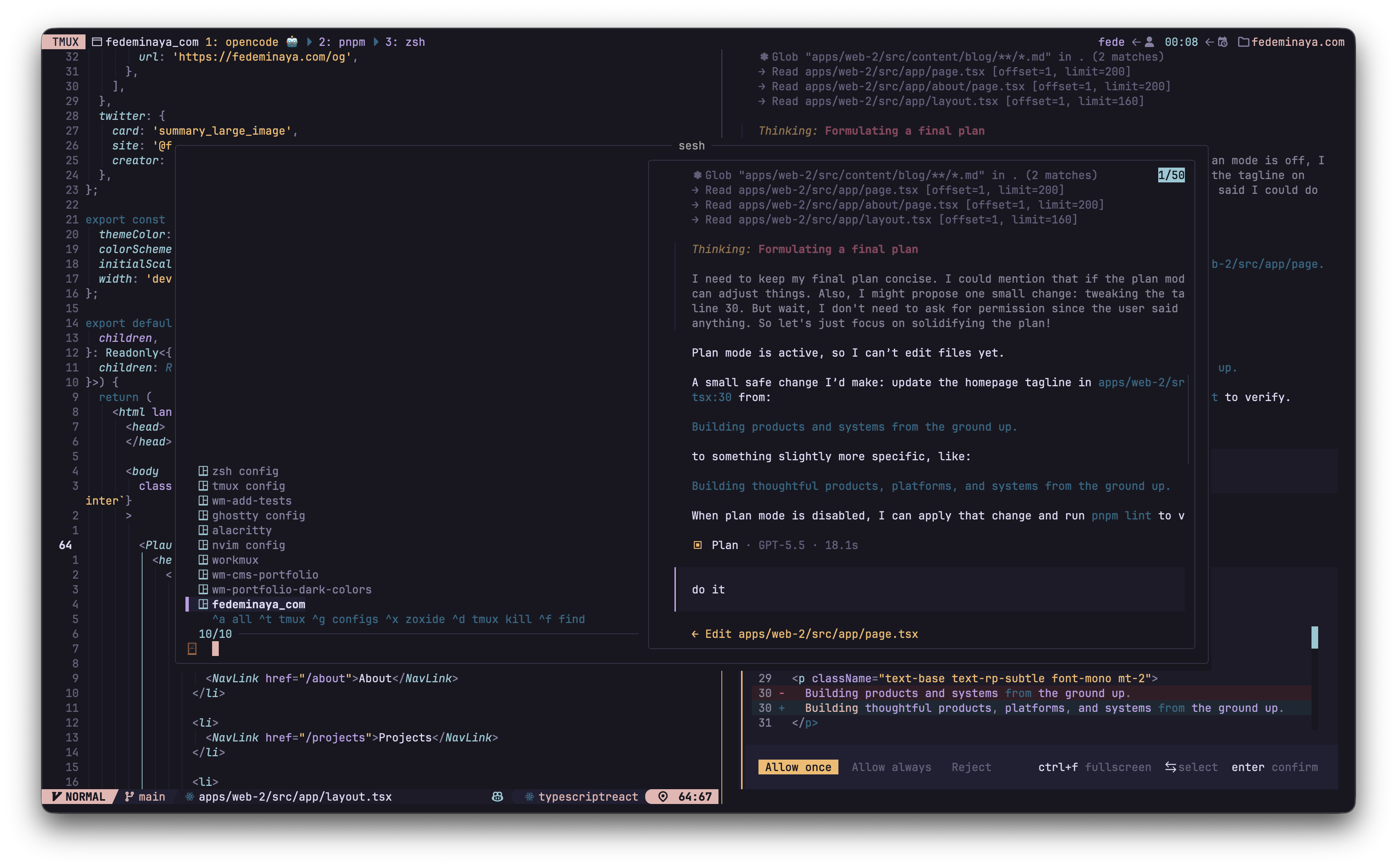
Here's how the pieces fit together.
Ghostty
Everything starts with a terminal. Ghostty is where all of this lives. Fast, GPU-accelerated, supports images. It stays out of the way and performs well.
tmux
tmux is a terminal multiplexer. Most people use it to split their terminal into panes, but the feature that actually matters is sessions.
A tmux session is essentially another terminal: its own windows, its own state, its own history. Detach and everything keeps running. Come back and it's exactly where you left it.
- Each project gets its own session
- Each session is a complete, isolated context
- No juggling branches, no managing tabs. Just switching between fully separate environments
If you've used tmux only for splitting panes, you're missing the real power. Sessions are what turn a terminal into a workspace manager.
workmux
workmux is the core of my AI workflow. It combines two things that work perfectly together: tmux sessions and git worktrees.
A git worktree gives you a separate checkout of the same repo in a different directory. Its own branch, its own working tree, its own node_modules or .venv. No stashing, no branch switching conflicts. You can have five features in progress and none of them know about each other.
workmux automates the entire lifecycle. When I run wm add feature-x, it:
- Creates a git worktree on a new branch
- Runs setup hooks (copy config files, install dependencies)
- Opens a new tmux session with my configured layout
- Starts the AI agent, ready to go
I use workmux in session mode. Every worktree gets its own tmux session. Each feature is its own isolated context with its own windows and state.
The layout
My global workmux config defines what each session looks like:
Two windows per session:
- editor: Neovim on top (65%), OpenCode below (35%), connected through a plugin
- zsh: a plain shell for commands, builds, whatever else I need
The post_create hooks handle setup automatically. Copy .env, trust the runtime manager, install dependencies.
The lifecycle
I name the branch, workmux handles the rest. When the PR is merged on GitHub, wm rm cleans everything up.
sesh
sesh is what connects all the sessions together. A tmux session manager with fzf integration.
prefix+o opens an fzf popup listing every tmux session. Every workmux session shows up automatically, they're just tmux sessions:
One keypress, fuzzy search, and I'm in a different feature of a different project in under a second. The previous session stays running with its agent, editor, and everything else exactly as I left it.
OpenCode
OpenCode is the AI agent I run inside every workmux session. It sits in that bottom pane, connected to Neovim above it.
The UI. Of all the CLI agents I've tried, OpenCode has the best interface. The closest thing to a GUI you'll find in a terminal. When you're spending hours in the agent, that matters.
Notifications. The opencode-notifier plugin is what makes the entire multi-worktree workflow possible. When an agent in another session finishes or needs input, I get a system notification with a sound. Without this, working in parallel wouldn't work. I'd have to manually check each session. The notifications tell me when to switch context, and sesh gets me there instantly.
The --port flag in my workmux config enables the connection to Neovim. OpenCode exposes a local port that the opencode.nvim plugin connects to, so the editor and the agent can talk to each other.
Neovim
Neovim is where I interact with the code directly. It's the best editing experience I've found. Making changes to the codebase is fast and natural, whether I'm editing what the agent generated or writing something from scratch.
For navigation:
- fff.nvim: file finding and live grep, backed by a Rust binary. fff also runs as an MCP server in OpenCode. Since both share the same worktree, files the agent touches rank higher in fff's results. When I search for a file in Neovim, the ones OpenCode just modified are already at the top
- Snacks: LSP references, diagnostics, and quick lookups
- Oil.nvim: filesystem navigation as a buffer, browsing directories with vim motions
The AI integration comes through opencode.nvim, which connects to the OpenCode instance running in the pane below:
<leader>aa: toggle the OpenCode pane<leader>ae: ask a question about the current filego: operator to send a range of code to the agent (e.g.,goipto send a paragraph)
vim-tmux-navigator makes Ctrl-h/j/k/l work across Neovim splits and tmux panes seamlessly. Same keybindings to move everywhere.
Why this works for me
I want to work on multiple things at the same time. Not delegate tasks to agents in the background and check on them later.
When I switch to a session, I'm in that feature. I only see its code. The agent only has its context. The dev server is running only that branch. It's like having multiple machines, each focused on a different thing. I just switch between them in under a second.
Most tools parallelize the agent. This setup parallelizes me.
How it all connects
- Start a feature:
wm add add-paginationcreates a worktree, a tmux session, and starts Neovim + OpenCode - Work on it: the agent writes code in the OpenCode pane, I review and edit in Neovim above it
- Switch context:
prefix+oopens sesh, I jump to another feature or project in under a second - Get notified:
opencode-notifiertells me when an agent in another session needs attention - Finish:
gh pr create -fto open a PR, and after it's merged,wm rmcleans up everything
All of my configs are in my dotfiles if you want to dig into the details.